Download: Backpacking Gear Planner 2.0

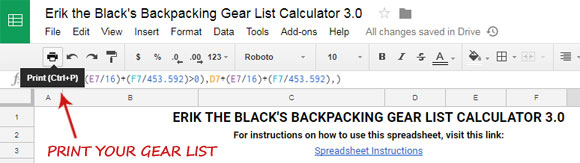
Here is the new version of my Free Backpacking Gear Planner Spreadsheet.

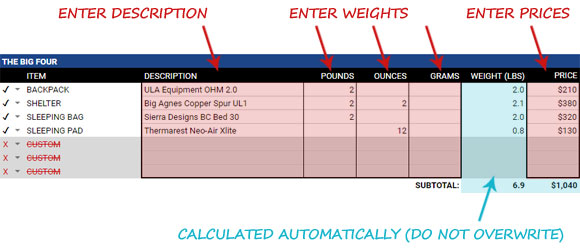
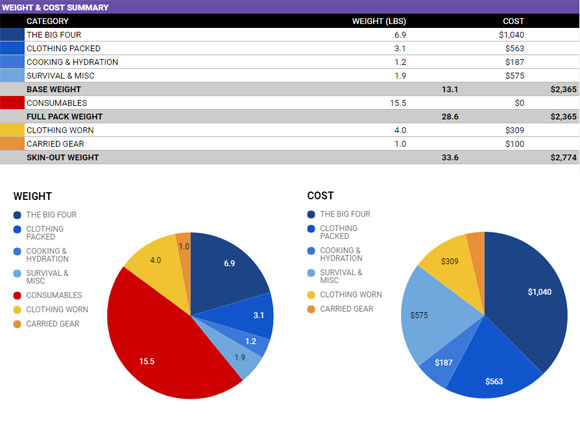
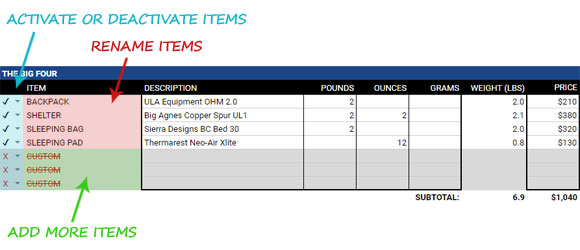
This tool helps you quickly and easily design a complete backpacking gear list in minutes… without having to do any of the math or complicated calculations yourself.

Version 2.0 includes new advanced features and more customization options.

Backpacking Gear Planner 2.0 Video Tutorial

Watch this video to see the new Gear Planner 2.0 in action!

*Important: You must own a copy of Microsoft Excel in order to use the Backpacking Gear Planner Spreadsheet. Microsoft Excel is part of the Microsoft Office Suite of programs.

FREE DOWNLOADS:

* Join my Free Backpacking Tips Newsletter at the top of the page to download my Colorado Trail Gear List in Microsoft Excel and Adobe PDF format (plus 3 more bonus gear lists).

If you have questions or comments, please post in the comments section below.

Twitter Digg Delicious Stumbleupon Technorati Facebook Email

40 Responses to “Download: Backpacking Gear Planner 2.0”

  1. dennis phelan 10. Dec, 2010 at 3:44 pm

    You have listened to your customers
    You have paid attention to details
    You have made this user friendly

    The results can be summed up in one word

    PERFECT

  2. Erik,
    Outstanding. Best gear planning spreadsheet anywhere. Thanks.

    Dave

  3. Erik,

    This spreadsheet is awesome!! Really user friendly.

    btw – i’m really looking forward to reading your books when they are released :)

  4. Erik,
    You think just like I do, but you actually produce amazing products that follow your thinking!

    I thought my Excel gear spreadsheet was pretty cool and all inclusive but yours takes gear planning and weight & price calculating to another level! You are a great ambassador for the long-distance hiking community and a saint for providing such a great tool free of charge. Thank you! Much appreciated.
    Mike

  5. Erik,

    I am mostly a day hiker, but put in some epic day hikes from before sunrise to well after dark. I bring more than I need thinking to be prepared in case I have to spend the night. This spreadsheet clarifies and simplifies where I can trim and what I should consider as my best lightest weight. Thank you for helping me better organize my excursions.

  6. Is it possible to get an unlocked version of this GREAT Planning tool spreed sheet? This thing is fantastic. I would like to be able to view the formulas and possibly expand on it for my personal use.
    What a great planning idea!

  7. Thanks guys, I’m glad you like the new Gear Planner. If you use it to create any gear lists you would like to share with the public I’d be happy to host them here on the website for people to download (or if you have your own web hosting you can just post a link here in the comments).

    @Dave: I don’t plan to release an unlocked version because I spent a lot of time designing this and I want to protect that. However, if there are features you would like to see added to a future version let me know. I plan to keep making improvements based on user feedback.

  8. Excellent planner, i have one request. I use OpenOffice and everything works, except the check boxes to turn the lines on and off. Any way you can get these working in OpenOffice as well? Quite a few people are using it these days as an alternative to excel since its free. thanks.

  9. @Matt: Glad to hear it works (mostly) in Open Office. I don’t have that software but when I get some free time I’ll download and install it and see what I can find out.

  10. I can’t seem to get this to work. There are only 4 coljums and evrything is bunched in the middle. Help please :)

    -Thanx-

  11. @Sevens: Try re-downloading the spreadsheet. The file may have gotten corrupted during the download. If it still doesn’t work correctly then it’s most likely a compatibility problem with the software you’re using to edit it.

  12. A work around for OpenOffice users to the checkbox issue:

    Tools > Protect Document > Sheet (yes open office doesn’t seem to maintain excel document protections)

    then drag out Column A and you can manually change the preferences of =TRUE() and =FALSE() to activate or disable the lines.

    Hope this help until the Grand Master Excel Wiz Erik fiddles with OpenOffice.

  13. Russell Emerson 23. Jan, 2011 at 6:30 pm

    The spreadsheet does what it is supposed to very well, and it makes my planning a lot easier, as well as showing me where i could and should save weight.

    I had one issue with it that is minor in theory, yet becomes rather aggravating while i plan: when i scroll it only scrolls the part where i enter data on items to be packed, which left me with about 4-5 bars that i could scroll, this may have been so that you could see the chart at all times but it is a major hassle, any ideas f how to remedy this?

  14. @Russell: The top pane is frozen so that it will remain in view while you make changes to the spreadsheet. But I can create a modified version that will scroll up so you can see more lines at once. I will work on that as soon as I get a free minute and post it here.

  15. I just downloaded your gear planner, and was very excited to load it up. When I opened it, in my up to date excel, line 4 was huge. Which wouldnt be a problem but now all I can see is 5 lines of info. I was wondering if you could help me out. I would love to use your program, but right now its not suitable for my needs.

  16. My trail brother. You just made my life much easier. I do this manually on scratch paper and obviously with no graphical overview. I really appreciate your efforts combining cost/weight/gear decisions and “what if” all in one convenient document. I’m Glacier bound and this makes planning comprehensive. Here’s to the next camp at a beautiful tarn! Thanks.

  17. Erik,
    Thanks loads for the spreadsheet. For the first time ever I have managed to get my gear list off of scraps of paper and into an easy to use document. I am forever grateful.
    Shelly

  18. This is awesome, but is there a way to change it to grams instead of unces. and GBP instead of USD.
    Thanks

  19. Thanks Erik. Exactly what I needed. I am totally disorgainized, so this will really help….vicky

  20. Great planning tool. As usual, you have thought of everything and yet have kept it simple. A couple of important bugs hang in there despite three downloads and some repeated testing on MS Excel 2007. The ounces can’t be entered in any section other than the first (Packing) section.
    Unable to deselect the “ground cloth” item – pressing the check adds or removes the “shelter” checkmark but the gc remains checked at all times.
    i’m looking forward to using this planner more. I hope the feedback is helpful.
    JOrdan

  21. @Jordan I just re-downloaded the spreadsheet and I’m able to enter the weight in all of the categories correctly. Are you sure you are trying to enter the weight in the right place and not in a cell that is locked?

    Excel doesn’t do a good job of focusing mouse clicks, which makes it easy to check the wrong item (even when your pointer is in the right place). If you zoom in and you can get better accuracy on the check boxes.

  22. Hi Erik,

    Thanks for the new spreadsheet, I really like the improvements and you are the best at synthesizing and communicating information!

    Couple of issues I hope you don’t mind me pointing out. 1) I agree with Russell, would be nice to have choice to reduce or hide the charts. 2) When I clicked on 1 to try and look at the summary it said that the sheet was protected and I couldn’t access this functionality.

    Maybe… you should relegate the charts to the summary and print out (of course), but for data entry you enable all of the cells?!

    Thanks again for all your great information. t.

  23. Erik, happend across your videos on YouTube while searching for help-hint on how to properly pack a backpack. I’ve done some hikes and a few high altitude as well. I appreciate your tips and the simpleness of the gear. You have provided some ideas I hadn’t even considered when packing light. Seems like I alway try to take the kitchen sink in preparation for the elements. I’ve downloaded the documents you have provided and plan on starting afresh with the weight issue and taking only the essentials.

    Thanks again. I will continue reading your blog for more great ideas.

    Jonathan

  24. Hi there
    The spreadsheet looks good but
    I have a little problem, Where I live we count in Kilograms not in pounds
    1kg = 1000g
    I have problem using the spreadsheet when it is like that
    The USD I can go with but it would look nicer with “kr”
    I sthis something you can do anything about?

    Best regards

    Mats

  25. @Mats It’s not possible currently to do the weights in grams/kilograms instead of ounces/pounds. But I will keep that option in mind for a future version of the spreadsheet.

  26. Is there any chance of getting a UK version of this planner. It’s a great tool, but with the prices in Dollars and the weight in pounds, it doesn’t work so well for me

  27. @Chris I don’t have time to modify the spreadsheet for other currencies but I have recently unlocked it, so if you know Excel you are welcome to modify the formulas yourself to suit your needs. The password is “Secret”.

  28. Hi Erik,

    I’ve modified the excel for use in the UK now. It actually only took about 10 minutes as the metric weight system is a lot simpler. There is no need for all the complex functions you had to use with pounds and ounces.

    If you would like me to send you the UK version to upload to your site, let me know how I can get it to you.

    Thanks

    Chris

  29. @Chris: Cool! I always suspected there must be an easier way to do the pounds + ounces calculation but wasn’t sure how to pull it off. You can email it to me at erik at blackwoodspress.com – Thanks!

  30. @Erik
    I have converted it to metric in Open Office if you need it,I can email it

  31. Chris’s UK version is now available to download (scroll up, the link is under the American version).

    @Mats Thanks for doing the Open Office version. Please send it to me at erik-at-blackwoodspress.com and I’ll add it to the downloads section.

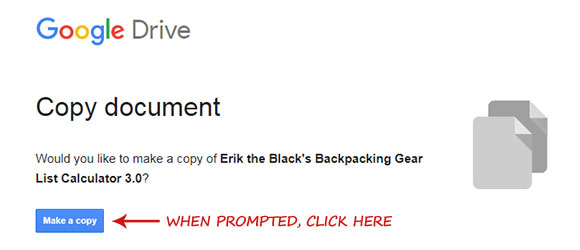
  32. It is possible to make a Google Docs version? Thanks.

  33. @Bo Sun: I am not familiar with Google Docs spreadsheet software. I don’t know if it can handle the advanced calculations and formulas required. But if it can, and there is an easy way to convert an Excel spreadsheet to Google Docs format, and someone wants to do the conversion, I will be happy to host it here.

  34. Erik,
    Thanks for making such a great resource available to your readers. Not only is this spreadsheet amazing, but I find your blog articles and videos informative and very creative. I will be reading your blog faithfully for now on.
    Best regards,
    Greg

  35. Have you got a mac spreadsheet version?

  36. @Ejner: I don’t have a version specifically for Mac, since I use a PC. But, if someone is willing to do the conversion I will be happy to post the Mac version here.

  37. FYI, I use a Mac with MS Office 2011. When I downloaded, it didn’t work quite right (check boxes missing). Then I saved it as .XLSX (latest excel format) and it worked perfectly. Just a tip for others. Thanks for a POWERFUL planning tool.

  38. Love the idea of charts! Just added them to my lists. Helps show the scouts what’s going on visually. Smokin’ idea.

    Just came across your blog yesterday via Redwood Outdoors. You have a great site! Thanks for all your controbutions to ULBP.

  39. David Fanning 22. Jan, 2012 at 8:35 am

    Running your spreadsheet in Windows 7. Looks great, but selecting/deselecting is problematic. It always seems to select the row *above* the one I want. I tried “zooming” per one of the comments I found here, but when I zoom I can’t get past the pie charts! This is Microsoft Office Excel 2007. Any ideas?

    Thanks for doing this. This is going to be great when the bugs are worked out!

  40. Erik,

    First of all thanks for the gear planner – best one I’ve found so far – well thought out and complete. One suggestion might be to add an additional checkbox that allows you to mark a piece of gear as shared and devides the weight accordingly.

    Love the site and thanks again for all of your hard work, it’s appreciated!

Leave a Reply